

Until now, I’ve written about managing everyday life and planning finances. In this article, I’m turning to a trend that has moved from the headlines into ordinary routines: artificial intelligence applications in daily life. AI now influences what we watch, how we move through cities, how banks monitor transactions, and how we track our health. The interesting part is not the hype; it is how these systems quietly shape practical decisions.
In simple terms, artificial intelligence refers to systems that learn patterns from data to recognize information, make predictions, generate responses, or support decisions. You may interact with AI dozens of times a day without opening a dedicated AI app—from email spam filters and voice assistants to personalized shopping recommendations, social media feeds, and GPS navigation. That familiarity is precisely why understanding these tools matters: convenience can hide limitations, bias, and privacy trade-offs.
From working through topics such as life management and financial planning, I’ve found that a tool is valuable only when it reduces friction without creating more work. Recent research from Pew Research Center found that 74% of U.S. adults would be willing to let AI assist with at least some day-to-day tasks. In the 10 examples ahead, we’ll examine the benefits, limits, and human judgment behind these everyday applications.
Everyday Convenience: How Artificial Intelligence Applications in Daily Life Shape Routine Decisions
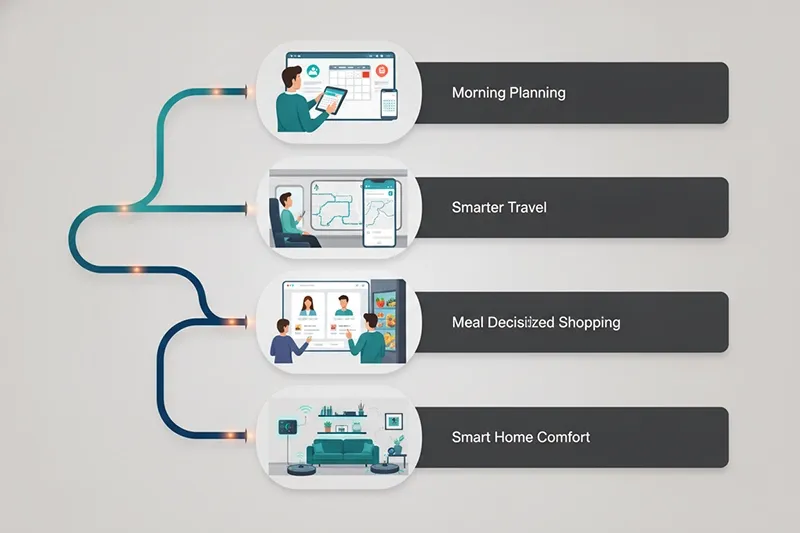
Check your phone, follow a navigation app to work, play a recommended podcast, and finish an email with suggested wording. Artificial intelligence applications in daily recommended podcast, and finish an email with suggested wording. Artificial intelligence applications in daily separate tool you deliberately open; often, it works quietly inside services you already use.
What makes these small interventions worth noticing? A suggested route, an automatically completed sentence, or a recommended product can influence what you see and choose. I sometimes discover recommendations that genuinely interest me, but relevance is only part of the picture. Understanding why a suggestion appears helps you decide whether it deserves your attention.
Navigation and Traffic Prediction
Sometimes, while driving, I struggle to work out alternative routes and turn to a navigation app, wondering, “How did it find that?” Navigation systems combine location data from participating devices, historical traffic patterns, live incident reports, and predictive models. Together, these inputs help estimate arrival times and suggest routes that may avoid congestion, although the quickest option can change as conditions develop.
An estimated arrival time is a prediction, not a promise. A new accident, sudden rain, road construction, or an unreported a promise. A new accident, sudden rain, road construction, or an unreported estimate less dependable. Understanding those limits helps explain why a route that looked sensible a few minutes ago may no longer be the best choice.
Should you follow every suggested turn? Treat the app as decision support rather than a substitute for observation. Check directions before setting off, stay alert to signs and changing conditions, and avoid handling your phone while driving. A recommended route never overrides road restrictions or safe judgment.
Practical Navigation Tip: Treat estimated arrival times as flexible predictions, check real-world conditions, and never allow a navigation instruction to replace attention to the road.
Streaming, Shopping, and Social Media Recommendations
Why does a platform sometimes recommend exactly what interests you? Recommendation systems analyze signals such as clicks, watch time, searches, purchases, likes, skips, follows, and browsing behavior. I occasionally come across suggestions that genuinely catch my interest. That relevance comes from identifying patterns in available data, not from understanding every reason behind a personal preference.
Streaming platforms use those patterns to encourage content engagement. Online stores surface potentially relevant products and encourage purchases, while social media feeds predict which posts may hold attention. These objectives overlap, but they are not identical. For users, the practical benefits include less searching, easier comparison, and opportunities to discover content or products they might otherwise miss.
Convenience has limits. Recommendations can reinforce existing preferences, narrow exposure, and encourage unnecessary purchases. Repeated visibility can also make popular content seem more valuable than its quality warrants. To Stay Organized, periodically review suggestions, unfollow irrelevant accounts, and deliberately explore unfamiliar topics. Before buying, ask: does this solve an actual need, or did the recommendation simply make it tempting?
Personal Devices and Communication: Practical Artificial Intelligence Applications in Daily Life
Daily communication involves more than choosing where to go or what to watch. Email filters, smartphone cameras, translation tools, and AI chatbots help process messages, images, speech, and information. For practical examples of how these assistants can support everyday routines, explore our guide to AI assistants for daily tasks. Their usefulness depends on the task: saving a few keystrokes requires a different level of scrutiny from protecting a device or translating a sensitive message.
Email Filters, Predictive Text, and Voice Assistants
Email systems use machine learning to recognize patterns associated with spam, phishing attempts, suspicious links, and potentially harmful attachments. Smart replies and predictive text use language models to suggest wording based on surrounding text. These features reduce repetitive communication work, but neither a clean inbox nor a fluent suggestion guarantees that every threat or mistake has been caught.
Could a suggested reply communicate something you never intended? Before sending, review its tone, accuracy, context, and wording. Voice assistants such as Siri, Alexa, and Google Assistant use speech recognition and language processing to interpret requests. Depending on the device and available features, they can set reminders, answer basic questions, play music, control connected devices, and manage recurring routines.
Hands-free convenience still deserves a privacy check. Review microphone permissions, linked accounts, voice-recording settings, and stored personal data. Check whether recordings are retained, how deletion works, and who may access them. Privacy controls differ across services, so inspect the settings rather than assuming that every spoken request stays only on your device.
Productivity Tip: Use AI to prepare a first draft or sort information, but keep the final review under human control.
Smartphone Cameras, Face Recognition, and Device Security
Smartphone cameras use AI-assisted processing for image enhancement, portrait effects, scene recognition, noise reduction, and automatic photo organization. The result can be a clearer low-light photo or a more searchable library. But does a better-looking image always represent the scene faithfully? Processing may alter texture, color, or detail, making the original worth checking when accuracy matters.
Facial detection identifies that a face is present; facial recognition attempts to match it with a specific identity. Photo grouping and face unlock may use related techniques, but their purposes and safeguards differ. Security varies between devices and implementation methods, so do not assume that every face-unlock feature offers equivalent protection or handles facial data in the same way.
Treat biometric access as one part of device security, not the entire system. Install software updates, choose secure authentication, review app permissions, and maintain a strong backup login method. Enable device encryption where applicable. The practical question is not simply whether unlocking feels effortless, but whether the overall setup protects your information. Convenience and security are related, not interchangeable.
Translation, Writing Assistance, and AI Chatbots for Planning and Learning
Language-based AI tools support automatic translation, grammar correction, spelling suggestions, transcription, summarization, and routine writing. Natural language processing helps interpret input and generate useful wording, but polished language can still contain inaccurate meaning, inappropriate tone, missing context, or culturally unsuitable phrasing. Before sending professional, legal, academic, financial, or sensitive communication, verify important details and consider qualified review when the stakes justify it.
AI chatbots can brainstorm ideas, summarize material, organize notes, produce first drafts, support language practice, and divide large projects into smaller steps. Their value is often organizational: moving tasks out of your head can reduce unnecessary cognitive pressure. However, can you trust every explanation or plan? Check factual claims and adapt suggestions to your actual responsibilities.
More lists, applications, and dashboards do not automatically produce a better system. Start with one narrow task, such as organizing meeting notes, then assess whether the tool genuinely reduces workload. Review the setup regularly and adjust it to your time and energy. Useful artificial intelligence applications in daily life should simplify a routine, not create another one to maintain.
Security, Health, and Trust: The Limits of Artificial Intelligence Applications in Daily Life

Artificial intelligence applications in daily life can create real value in banking, health tracking, and personal safety, but their usefulness depends on context and human judgment. These systems identify patterns, highlight unusual activity, and organize complex information faster than most people can. In my experience, an alert feels helpful only when I understand what it means and what action should follow. When decisions involve money, health, privacy, or safety, convenience should never replace verification.
Banking Fraud Detection, Health Tracking, Privacy, and Human Oversight
Banks may analyze transaction history, location, timing, device information, and spending patterns to detect activity that differs from normal behavior. This anomaly detection can identify possible fraud, but false positives, delayed alerts, blocked legitimate transactions, and incomplete context remain possible. I have learned to confirm suspicious activity through my bank’s official app or verified phone number, never through an unknown link in a message claiming to be a fraud alert.
Smartwatches, fitness trackers, and health apps can monitor activity trends, estimate sleep, and issue heart-rate alerts, while medical imaging systems can help professionals identify important patterns. However, AI can flag a change without providing a medical diagnosis. In my experience, tracking data is most useful for noticing trends and preparing questions. Wellness tracking, automated risk alerts, and professional medical assessment are different things; serious symptoms require a qualified healthcare professional.
Be Careful When: The decision involves health, money, safety, legal matters, private data, or an output that cannot be independently verified.
Using Artificial Intelligence Applications in Daily Life Strategically
AI becomes more useful when you choose it deliberately rather than adding tools simply because they are popular. The practical goal is not to automate everything, but to reduce friction in everyday routines without creating new problems. A helpful system should save time, lower mental pressure, and remain easy to review. This approach connects naturally with Organized in Life, where organization supports real priorities instead of becoming another full-time hobby.
Choose AI for Narrow, Repetitive, or Information-Heavy Tasks
Start with one recurring task that is repetitive, time-consuming, information-heavy, predictive, and easy to review. AI can sort emails, summarize notes, prepare a first draft, compare options, or organize a basic schedule. I usually recommend testing one problem before adding several tools, because too much automation quickly becomes another responsibility. Keep judgment, accountability, and expertise human; AI should assist the workflow, not quietly become its manager.
Review the System, Not Just the Output
A polished result does not automatically mean the system is useful. Ask whether it saved time, reduced mental pressure, stayed accurate, and avoided creating extra checking or correction work. Also consider whether a simpler method would work better and whether you shared unnecessary personal information. I have abandoned tools that produced impressive outputs but demanded constant supervision. Every organization system needs periodic review because your circumstances, workload, and priorities change.
Keep Human Judgment at the Center
Treat AI output as a draft, recommendation, prediction, signal, or starting point—not an unquestionable answer. Verify important information and adjust suggestions to your actual circumstances, especially when context matters more than speed. The value of AI depends on how well it fits the surrounding workflow, not how advanced the tool sounds. Human judgment remains essential for decisions involving health, money, safety, privacy, legal matters, and professional responsibility.
Make the System Fit Real Life and Revisit It Regularly
A productivity system should serve your real life, not an imaginary version with unlimited time, energy, attention, and enthusiasm for dashboards. Consider your changing responsibilities and the effort required to maintain each tool. I review systems by keeping anything that reduces friction, simplifying tools that demand too much care, and removing those that create more checking than value. More reminders and automated workflows do not guarantee better organization; sometimes they simply create prettier clutter.
Conclusion
Artificial intelligence can make daily life more organized, efficient, and manageable when it is applied to the right tasks. It can reduce repetitive work, clarify information, support planning, and reveal useful patterns. Still, the best results come from thoughtful use rather than constant automation. Choose one practical problem, test the tool, review its real impact, and remove anything that creates more effort than value. AI should support your decisions and routines—not replace your judgment, privacy, or personal responsibility.
Was this article helpful?
Next Article
How to Stay Organized: Practical Ways to Organize Your Daily Life
Comments(0)
Be the first to leave a comment.