
When I first audited my own residential setup after years of analyzing software vulnerabilities, I realized something unsettling: most intruders do not hack sophisticated systems; they simply walk through an open door. According to security data, a significant percentage of household burglaries happen because an entry point was left unlocked. This eye-opening field observation changed how I view physical safety, proving that robust home security tips must combine everyday mindfulness with modern technology.
Transitioning to smart home security is not about wrapping your house in an intimidating fortress; it is about building a quiet, intelligent layer of awareness. Throughout my practical tests, I discovered that relying solely on high-end gadgets without solid routines creates a false sense of security. True protection bridges the gap between human habits and automated alerts, giving you complete peace of mind whether you are downstairs or miles away.
How to Secure Your Home: Essential Security Measures
When evaluating physical protection during my field reviews, I noticed that technology alone cannot compensate for neglected physical boundaries. Before investing in advanced automation, you must master foundational defensive measures. Understanding how to secure your home starts with hardening entry points, maintaining disciplined daily habits, and optimizing outdoor visibility to deter opportunistic intruders effectively.
Securing Physical Entry Points (Doors and Windows)
Weak entry points invite unauthorized access. Criminal justice research from the UNC Charlotte study indicates that about 60% of convicted burglars move on when they observe visible security hurdles. Installing solid-core doors, 1-inch deadbolts, and reinforcing window frames transforms your property into a hard target. For those exploring comprehensive smart home idea integrations, pairing these physical reinforcements with smart sensors creates a formidable first line of defense.
Daily Habits and Routine Security Checks
Even the strongest deadbolt fails if left unlocked. Statistical insights show that a significant portion of break-ins occur simply because doors or windows were left unsecured during short absences. Establishing a strict closing routine before bed or departure eliminates human oversight. Cultivating consistent home safety tips into daily life ensures your physical infrastructure is actively working for you around the clock.
Exterior Lighting and Visibility Basics
Darkness provides concealment for unauthorized prowlers. Strategic exterior lighting, combined with well-trimmed landscaping around windows and pathways, removes potential hiding spots. Motion-activated floodlights and smart bulbs act as immediate psychological deterrents, signaling that the property is occupied, monitored, and unsafe for anyone attempting clandestine entry.
Smart Home Security Devices and Their Uses
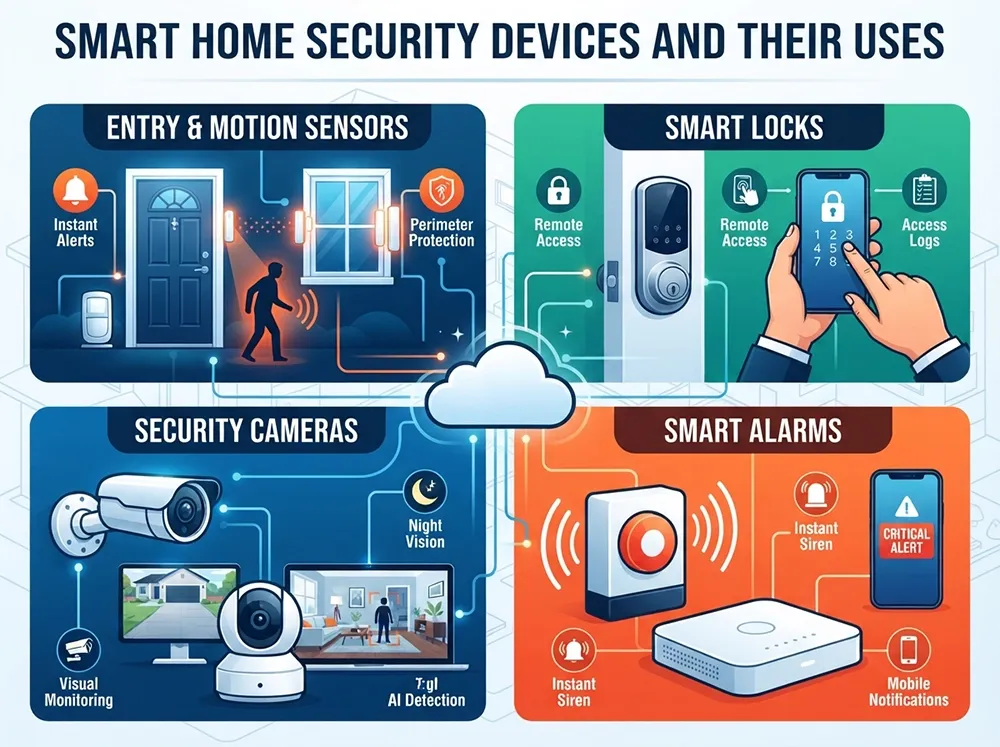
Modern property protection relies on a harmonious ecosystem of hardware. Integrating intelligent home security devices transforms a passive building into an active, responsive environment. By deploying specialized home security sensors alongside high-definition home security cameras, you create multiple layers of defense that catch threats before they escalate.
Entry and Motion Sensors for Perimeter Protection
Perimeter defense begins at the boundary of your living space. Magnetic contact sensors on doors and windows immediately flag any unauthorized opening, while infrared motion detectors track movement within key transition zones.
During my testing phases, I found that placing these sensors strategically near ground-floor access points stops intruders instantly. They act as invisible tripwires that trigger immediate alerts long before anyone reaches your primary living areas.
Smart Locks: Keyless Entry and Remote Access
Physical keys can be lost, copied, or stolen, introducing unnecessary vulnerabilities. Upgrading to electronic deadbolts allows you to manage entry permissions directly from your smartphone, granting temporary access to guests or service providers while maintaining a complete digital audit log.
- Remote Locking: Instantly secure your front door from anywhere in the world if you forget to lock up during departure.
- Auto-Lock Timers: Configure doors to lock automatically after a set period, eliminating human error.
- Activity Logs: Monitor exact timestamps of who enters and exits your property throughout the day.
Security Cameras and Visual Monitoring
Visual verification is invaluable when assessing potential alerts. Modern optical hardware provides crisp high-resolution feeds, night vision, and wide-angle lenses to cover vulnerable blind spots around your property perimeter.
Rather than recording endless hours of empty footage, advanced units utilize edge-processing algorithms to distinguish between swaying tree branches, family pets, and human intruders. This precision drastically minimizes false alarms while ensuring you only receive notifications that actually matter.
Smart Alarms and Instant Siren Systems
Deterrence is often the fastest way to neutralize a threat. Integrated acoustic sirens combine high-decibel audible alarms with immediate push notifications to your mobile device, startling intruders and notifying neighbors simultaneously.
Deploying a loud, multi-tone siren creates an immediate psychological barrier, forcing unwanted visitors to flee before they can attempt forced entry into deeper parts of your home.
How Do Smart Home Security Systems Work?
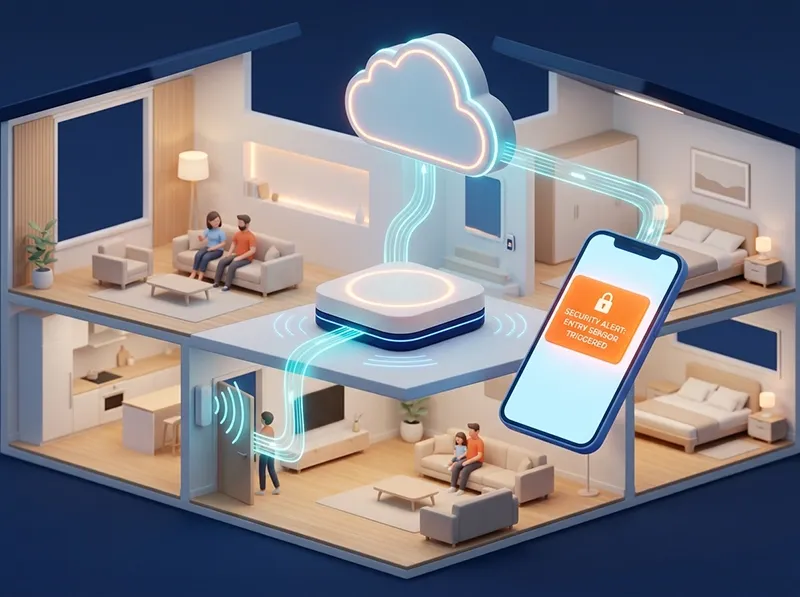
Understanding how do home security systems work requires looking past individual gadgets and examining the underlying architecture. Modern home security systems operate through a synchronized ecosystem where sensors, controllers, and cloud servers communicate continuously to maintain uninterrupted property surveillance.
The Role of the Central Hub or Base Station
The base station acts as the brain of your entire security setup. When any peripheral sensor detects an anomaly, it transmits a wireless signal directly to this central hub.
During system stress tests, I noticed that having a reliable battery backup and local cellular failover inside the hub is crucial. If an intruder cuts your primary power or internet line, the central base station ensures emergency protocols execute without interruption.
Communication Protocols (Wi-Fi, Z-Wave, Zigbee)
Smart devices need a common language to talk to one another and your hub. Selecting the right wireless protocol directly impacts your system's reliability, latency, and battery longevity across large residential spaces.
Protocol | Range | Power Consumption | Best Use Case |
Wi-Fi | High (~150 ft) | High | Security cameras, video doorbells, high-bandwidth streaming |
Zigbee | Medium (~30-60 ft) | Very Low | Motion sensors, door contacts, mesh network expansion |
Z-Wave | Medium (~100 ft) | Very Low | Smart locks, thermostats, thick wall penetration |
Mobile Apps and Real-Time Push Notifications
The final link in the operational chain bridges your home architecture directly to your smartphone. When an event occurs, cloud infrastructure processes the trigger and fires instant push notifications to your mobile device.
This immediate feedback loop allows you to inspect live video feeds, disarm specific zones remotely, or alert local authorities within seconds of a detected breach.
Self-Monitored vs. Professionally Monitored Home Security
Choosing the right oversight model is a critical decision when setting up self monitored home security. Property owners must weigh the autonomy and cost savings of managing alerts themselves against the round-the-clock peace of mind provided by a paid third-party monitoring service.
What Is a Self-Monitored System and Who Is It For?
A self-monitored setup relies entirely on you. When a sensor trips or a camera spots motion, the system sends an alert straight to your smartphone, leaving you responsible for calling the police or ignoring a false alarm.
This model suits tech-savvy homeowners and anyone integrating custom automation layers into a modern Smart House Design framework. It eliminates recurring monthly fees and gives you absolute control over your private data and device triggers.
Professional Monitoring: Pros, Cons, and Monthly Fees
Professional monitoring connects your hardware to a dedicated call center staffed 24/7. If an alarm sounds, operators verify the event and dispatch emergency services on your behalf, even if your phone is dead or you are asleep.
- Pros: Immediate emergency dispatch, uninterrupted coverage during travel, and potential homeowner insurance discounts.
- Cons: Mandatory ongoing monthly subscription fees and less direct control over local alert handling workflows.
Choosing the Right Monitoring Model for Your Lifestyle
Deciding between these options depends on your daily schedule, budget, and travel habits. If you work from home or live in a tight-knit community, self-monitoring offers incredible financial efficiency.
Conversely, frequent travelers or larger estates often benefit from the safety net of professional oversight, ensuring that a security breach never goes unnoticed while you are away.
Smart Home Security and Digital Privacy
Physical hardening is only half the battle when deploying smart home security. As connected devices permeate our living spaces, cyber threats become just as dangerous as physical intruders. Following expert home security advice means recognizing that a compromised network can leave your digital and physical world exposed to malicious actors.
Securing Your Home Wi-Fi Network
Your router acts as the front door to your digital ecosystem. According to National Institute of Standards and Technology (NIST) guidelines on IoT network segmentation, you should always isolate smart home devices from your primary computers and financial documents by setting up a dedicated guest or VLAN network.
During my configuration audits, I found that creating a separate network prevents lateral movement if a cheap smart plug or insecure bulb gets compromised by external actors.
Strong Passwords and Two-Factor Authentication (2FA)
Credential reuse remains one of the primary vectors for unauthorized digital access. NIST explicitly warns against credential stuffing attacks, where hackers leverage leaked database credentials to breach multiple accounts.
- Unique Passwords: Never use repetitive passwords across your security cameras, smart locks, and mobile apps.
- Two-Factor Authentication: Enable 2FA using hardware keys or authenticator apps rather than SMS wherever available.
- Password Managers: Utilize encrypted managers to generate and store complex, unguessable access keys.
Managing Firmware Updates and Device Privacy
Stale firmware contains known vulnerabilities that automated botnets actively scan for on the internet. Adhering to NIST cybersecurity guidelines means setting up automatic firmware updates or scheduling monthly manual reviews for all connected smart hardware.
Furthermore, review app permissions regularly. Disable cloud storage features for indoor cameras if you prefer local recording, ensuring your private moments stay strictly within your household.
Smart Home Security Checklist: Step-by-Step Implementation
Turning theoretical concepts into an actionable roadmap can feel overwhelming. Implementing solid home security advice requires breaking down your upgrade path into manageable milestones. By following these practical home security tips, you can systematically eliminate vulnerabilities without disrupting your daily routine.
Immediate Actions You Can Take Today
You do not need an expensive tech budget to dramatically improve your property safety right now. Start by auditing your current physical and digital habits with these quick wins:
- Audit Entry Points: Verify that all deadbolts, window locks, and sliding door security bars are fully functional.
- Hide Valuables: Move expensive items away from street-facing windows to avoid tempting window shoppers.
- Update Credentials: Change default router and smart lock administrator passwords immediately.
- Eliminate Spare Key Traps: Remove fake rocks or doormat keys and store spares securely.
Long-Term Upgrades and Smart Additions
Once your immediate physical and digital baselines are secure, you can invest in scalable automation upgrades. Long-term planning ensures your infrastructure grows alongside your household needs:
- Deploy Perimeter Sensors: Install integrated door contacts and motion detectors linked to a local base station.
- Upgrade Optical Hardware: Integrate smart video doorbells and cloud-managed exterior cameras for visual verification.
- Choose a Monitoring Model: Decide between self-monitoring apps or a professional 24/7 call-center service depending on your travel habits.
Conclusion
Securing your living space is not about creating an intimidating fortress, but rather establishing a balanced ecosystem where daily habits, robust physical barriers, and intelligent smart home security seamlessly work together. By combining proactive physical measures with modern sensors, reliable monitoring models, and strict digital privacy protocols, you eliminate common vulnerabilities and protect what matters most. Ultimately, true peace of mind comes from building a responsive, well-maintained defense system that safeguards your household around the clock.
Was this article helpful?
Next Article
How to Simplify Your Life: Proven Strategies for Simple Living and Daily Clarity
Comments(0)
Be the first to leave a comment.