
To be completely honest, across dozens of site deployments and technical installations, I have witnessed setups so chaotic they could convince anyone to abandon automation altogether. The single most costly mistake people make is treating home intelligence like an impulse shopping spree. They purchase random, colorful gadgets and end up with fourteen fragmented mobile apps, dead batteries, and constant network dropouts.
Have you ever wondered why so many connected properties feel less like peaceful sanctuaries and more like high-stress IT crisis centers? The hard truth is simple: most automated setups fail not from bad technology, but from a total absence of structural smart home planning. A durable smart house design is an architectural discipline, engineered into your floor plans alongside your framing, plumbing, and HVAC systems.
If your goal is learning how to make your house a smart home, you must abandon the retail mindset. True residential intelligence does not demand daily troubleshooting or command your attention. When executed properly, thoughtful smart house design helps simplify your life by eliminating digital clutter and constant maintenance, anchoring seamless daily living through dedicated wiring, physical backboxes, and robust local control long before the drywall is finished.
Infrastructure First: Why Physical Cabling Dictates Smart House Design
When planning a resilient living space, your wireless devices are only as dependable as the hidden copper wires behind your walls. Treating hardwired cabling as a secondary priority is the quickest route to chronic system latency, connection drops, and daily headaches. Just as smart homeowners practice disciplined personal financial planning to build lasting security before making speculative investments, a solid smart house design requires front-loading your budget into non-negotiable physical infrastructure. The core principle is straightforward: wire whatever stays stationary, leaving wireless airwaves completely open for mobile hardware.
Structured Copper and the Limits of Residential Wi-Fi
In typical smart home construction, placing dozens of endpoints on basic Wi-Fi immediately saturates the wireless spectrum. Every smart plug, camera, and display competes for the exact same radio channels, causing micro-freezes and unresponsive automations. By running dedicated Cat6 or Cat6A solid-copper home runs to stationary equipment—such as 4K media hubs, desktop workstations, and ceiling access points—you remove heavy throughput burdens from the air entirely.
When I first set out to implement smart automation, I treated wireless mesh networks as a silver bullet for building a smart home. That assumption changed during a project where sixty wireless accessories frequently dropped off the local network simultaneously. After terminating those lines into a centralized, well-ventilated equipment enclosure with patch panels, system response times plummeted to near-instantaneous speeds. A dedicated low-voltage utility closet provides the cooling, surge protection, and organization your network processors need to run reliably 24/7.
Central Low-Voltage Utility Closet
- Cat6A: Ceiling Wi-Fi 7 Access Points (Clean Airspace)
- Cat6A: Primary Media Centers & Home Office Workstations
- PoE: Exterior Cameras, Touch Panels & Doorbells
Power over Ethernet (PoE) as an Operational Standard
For exterior security cameras, touchscreens, and entry intercoms, Power over Ethernet (PoE) remains the gold standard in modern smart home infrastructure. Delivering high-speed data transmission and low-voltage electrical power across one twisted-pair cable permanently eliminates the hassle of climbing ladders to replace dead camera batteries every four months. It also avoids running messy, exposed wall chargers to your living room interface panels.
Engineering & Productivity Rule: The 80% PoE Power Budget
When selecting your primary network switch, calculate total connected load and reserve at least 20% headroom. Running PoE switches above 80% capacity introduces thermal stress and unexpected port restarts. For Cat6 or Cat6A runs, cap total physical distance at 90 meters (295 feet) to prevent packet attenuation and voltage drop.
Empty Conduits: Future-Proofing Through Smurf Tubes
No engineer can predict what cabling standards will dominate domestic architecture three decades from now. The most effective way to protect your property during smart home new construction is installing continuous 1.5-inch flexible non-metallic conduit—often called "smurf tube"—from your basement rack directly up to the attic and main living rooms.
As the custom installation authority CEDIA emphasizes in its core wiring documentation:
Unused cables are far cheaper than removing walls in the future.
Running empty conduit takes minutes during framing, but pulling a replacement fiber line through an existing pipe later saves thousands of dollars in invasive drywall demolition.
Electrical Planning: Designing Switch Boxes and Dedicated Circuits
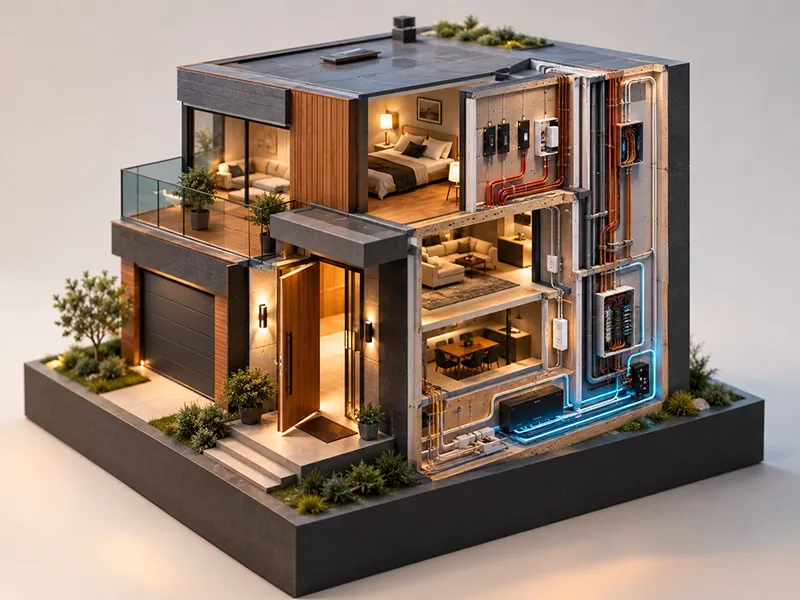
Residential electrical codes prioritize basic fire and life safety, but they rarely anticipate the physical demands of modern automation hardware. When building a smart house, assuming that your general electrical contractor will automatically install smart-ready infrastructure is a costly mistake. If you have to tear into brand-new plasterboard just to power a smart dimmer or clear room for a control module, your planning has failed before you even unpack your first device. Incorporating smart infrastructure from the blueprint stage is the most reliable way to figure out how to secure your home from electrical retrofitting headaches later.
Critical Smart House Features for In-Wall Rough-In
The single most critical electrical requirement is pulling a continuous neutral wire into every single gang box across the property. Traditional mechanical switches merely interrupt the hot leg to cut power to a ceiling fixture. Smart dimmers, switches, and relays, however, are miniature computers that house onboard microprocessors and radios. They require their own complete circuit to remain powered 24/7, even when the connected light fixture is completely turned off.
Equally crucial is backbox volume. Standard residential junction boxes are often shallow (around 2 to 2.5 inches deep), leaving barely enough clearance for wire nuts and thick 14/2 copper romex. When integrating premium smart house features, specify extra-deep (3.5-inch) backboxes on your rough-in plans. This extra breathing room accommodates bulky smart dimmer bodies, multi-gang connections, and micro-relays without crushing internal wiring or creating hazardous thermal buildup.
Motorized Window Shade Pre-Wiring
Automated window treatments rank among the most practical smart home design ideas, managing natural solar heat gain while preserving daily privacy. Yet nothing ruins high-end architectural aesthetics faster than thick battery wands hung awkwardly behind linen fabric or cords dangling down window trims.
When learning how to build a smart home from the ground up, run low-voltage 16/2 or 18/2 copper wire directly from a centralized low-voltage power supply panel to the upper framing headers of every window opening. Hardwiring shades delivers three immediate engineering advantages:
- Whisper-quiet operation: Hardwired motors draw consistent line power and operate far quieter than compact battery motors.
- Zero maintenance: Eliminates the ongoing chore of taking down shades or climbing stepladders to plug in USB recharging cables.
- Slimline hardware: Allows recessed pocket ceiling installations with minimalist profiles that blend seamlessly into your finished architecture.
In-Wall Electrical Rough-In: Standard Construction vs. Engineered Smart Design
Electrical Priority | Traditional Rough-In | Engineered Smart House Design | Practical Homeowner Impact |
Neutral Wiring | Often omitted in simple switch loops | Continuous neutral in every single junction box | Powers smart switch radios reliably; stops LED light flickering and buzzing |
Backbox Depth | Shallow 2.0" to 2.5" plastic or metal boxes | Extra-deep 3.5" boxes (or adjustable brackets) | Houses smart dimmers and in-wall micro-relays cleanly without thermal crowding |
Window Treatments | Zero wiring; relies on aftermarket battery shades | Low-voltage (12V–24V) pre-wire to window headers | Enables ultra-quiet, flush-mounted motorized shades with zero battery maintenance |
Appliance Circuits | Shared branch circuits across multiple zones | Dedicated home runs for critical loads & subpanels | Protects delicate microcontrollers and prepares panels for whole-home energy tracking |
Automation Architecture: Matter, Thread, and Local Stability
A beautiful floor plan and pristine copper wiring mean little if your home’s software backbone relies on unpredictable external cloud servers. When designing an integrated living space, hardware choices must guarantee that the property remains fully operational under all conditions. True stability requires severing reliance on remote cloud endpoints, prioritizing local execution, and implementing unified communication standards that keep your ecosystem responsive, private, and permanent.
Breaking the Cloud Dependency Loop
During field deployments, the most frustrating scenarios occur when an internet service provider suffers an unexpected outage. In poorly planned setups, homeowners suddenly discover they cannot turn on the hallway lights, adjust their heating, or unlock their front doors simply because their broadband connection dropped. Relying on remote servers introduces artificial latency, leaves you vulnerable to third-party subscription price hikes, and turns hardware into useless e-waste if a manufacturer shuts down its servers.
A resilient smart house design enforces a local-first architecture. By running your ecosystem through an on-premises controller—such as an edge processor, Hubitat Elevation, or a dedicated Home Assistant yellow/green appliance—all trigger events, sensor calculations, and automation scripts execute directly within your local network perimeter. Your lights flip on in single-digit milliseconds, your data stays strictly inside your walls, and your house continues running flawlessly even if the outside internet is completely severed.
Matter and Thread in Modern Smart House Design
For years, fragmented wireless standards forced homeowners into restrictive single-brand walled gardens. The modern baseline for smart home technology solves this problem through two complementary, vendor-agnostic standards:
- Matter (The Application Layer): Think of Matter as a universal translator. Certified by the Connectivity Standards Alliance (CSA), Matter provides a common language that allows Apple Home, Google Home, Amazon Alexa, and Samsung SmartThings to control the same physical hardware locally over standard IP protocols without vendor lock-in.
- Thread (The Network Transport Layer): Thread is a low-power, IPv6-based, self-healing wireless mesh protocol designed specifically for battery- and line-powered smart devices like door sensors, locks, and wall dimmers.
Unlike legacy setups requiring individual proprietary hubs for every device brand, Thread devices communicate through open Thread Border Routers (often embedded inside smart displays, Apple TVs, or wireless access points).
As the Thread Group technical whitepapers outline, an open IP mesh network dynamically re-routes communication packets around offline nodes. If one smart plug is unplugged, the surrounding sensors instantly reroute signals through neighboring nodes without missing a beat.
Application Layer | Matter (Universal Interoperability Standard) |
Network Transport Layer | Thread (Low-Power Mesh) |
Key Device Categories | • Motion & Door Sensors • Smart Deadbolts • In-Wall Dimmer Switches |
Core Operational Strength | Ultra-low power, self-healing mesh, instant sub-second response |
Connecting Physical Design to Daily Automations
Once your physical wiring and local protocols are established, the house shifts from passive infrastructure into active support for daily life. Reliable hardware eliminates the friction often associated with complex smart home automation ideas. When micro-switches, occupancy sensors, and climate monitors operate on local sub-second loops, you can implement subtle home automation ideas—like softly illuminating late-night pathways or automatically balancing heating zones when rooms become occupied—without worrying about lagging cloud commands.
To see how these local network foundations translate into tangible daily workflows, explore our curated breakdown of smart home ideas to spark inspiration for your room-by-room scenes and energy routines. Designing the system properly today ensures that whatever creative automation ideas you deploy tomorrow will perform reliably for years to come.
Functional Domains: Essential Smart House Features for Daily Life
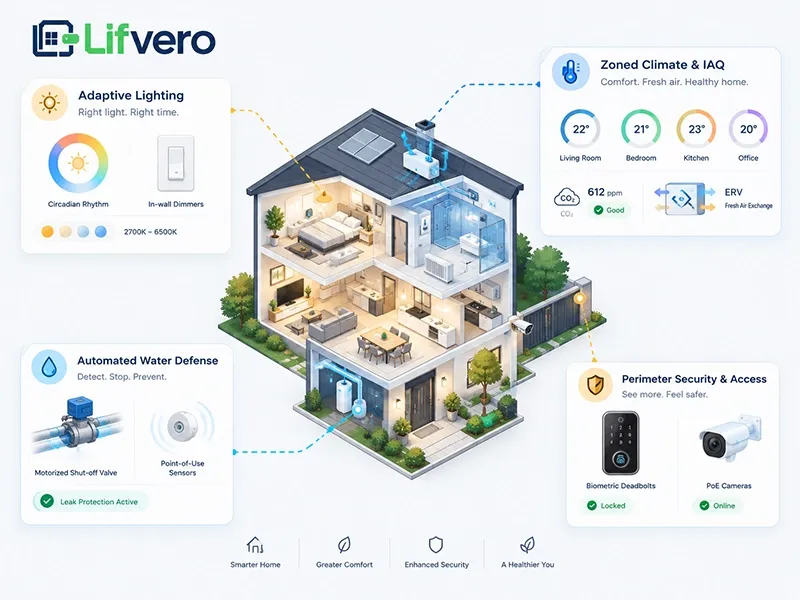
A truly smart home does not overload you with flashing dashboards or endless notifications. When selecting smart house features, the goal is ambient life management: systems that silently monitor and adjust the physical environment to support your health, focus, and security. By categorizing your hardware into three core functional domains—adaptive illumination, environmental climate control, and structural defense—you ensure that every installed device delivers concrete, everyday utility rather than technological novelty.
Adaptive Human-Centric Lighting and Wall Affordance
The most common trap in residential lighting is replacing standard light bulbs with wireless smart bulbs while leaving basic mechanical wall switches in place. The moment someone naturally flips the wall toggle to "off," power to the bulb's internal radio cuts out completely, breaking all scheduled scenes, automation routines, and remote access.
To maintain reliability, always prioritize smart in-wall dimmers, keypad controllers, or hidden in-wall relays paired with standard dimmable architectural fixtures. This approach preserves the intuitive muscle memory that every family member and guest expects.
In his foundational work The Design of Everyday Things, cognitive scientist Don Norman emphasizes the importance of intuitive interaction:
- When external signifiers or instructions have to be added to something as simple as a light switch or a door, it indicates bad design.
Nobody should have to download a smartphone app or read a cheat sheet simply to illuminate a guest bathroom.
Natural Solar Curve
- 08:00 AM: 4000K Crisp White (Suppresses Melatonin / Boosts Focus)
- 02:00 PM: 3000K Neutral White (Ambient Daytime Living)
- 09:00 PM: 2200K Warm Ember (Encourages Natural Sleep Prep)
At the software layer, your hardwired lighting should follow dynamic circadian rhythms. By automating subtle shifts in color temperature—transitioning from a cool 4000K daylight spectrum during productive morning hours to an amber, low-blue 2200K glow by late evening—your home actively reinforces your body's natural sleep-wake cycles.
Zoned Indoor Environmental Quality (IEQ) and Climate Control
Placing a single smart thermostat in a central ground-floor hallway is an obsolete strategy. A solitary sensor cannot balance the distinct thermal differences between a sun-drenched second-story bedroom and a shaded basement living room. Advanced smart home features decouple temperature sensing from the wall thermostat itself, deploying discreet room-by-room temperature, humidity, and millimeter-wave (mmWave) presence sensors to condition spaces only when occupied.
Modern climate design also prioritizes respiratory health through proactive indoor air quality (IAQ) monitoring:
- Automated Fresh-Air Exchange: Link your Energy Recovery Ventilator (ERV) or Heat Recovery Ventilator (HRV) directly to interior air-quality monitors. When indoor carbon dioxide ($CO_2$) climbs above 800 ppm during crowded gatherings, the system automatically draws in filtered outdoor air.
- Particulate Filtration: If particulate matter ($PM_{2.5}$) or volatile organic compounds (VOCs) spike from cooking, the central ventilation system automatically shifts into high-rate filtration before pollutants circulate into bedrooms.
This design methodology aligns with the U.S. EPA Indoor airPLUS and ASHRAE Standard 62.2 residential ventilation guidelines, which state that healthy indoor air quality must rely on continuous, background mechanical management rather than occupant memory.
Whole-Home Risk Mitigation and Access Control
While entertainment and lighting capture most of the consumer spotlight, proactive damage prevention provides the highest return on investment in smart house design ideas. Catastrophic water leaks cause billions of dollars in residential damage every year, yet they are almost entirely preventable through low-cost automated hardware.
Install hardwired or long-life wireless water sensors beneath high-risk fixtures, including water heaters, washing machines, dishwashers, and bathroom vanities. Pair these point-of-use sensors with an automatic, motorized shut-off valve installed immediately downstream of your main domestic water meter. If moisture is detected, the valve mechanically cuts off the incoming municipal water supply in less than three seconds—protecting structural subfloors even when you are thousands of miles away.
For exterior access, implement multi-modal electronic deadbolts that balance convenience with mechanical redundancy. Your primary entrance should feature biometric verification or a backlit PIN pad for keyless daily entry, but it must retain an authentic mechanical key cylinder to ensure entry during electrical failures. These protective installations represent essential smart home ideas for new construction, safeguarding physical assets from the moment you take occupancy.
Execution Strategy: What to Install Now vs. What to Add Later
Attempting to configure every automated feature simultaneously leads to decision fatigue, blown budgets, and chaotic project management. Understanding how to build a smart home successfully depends on drawing a clear boundary between high-friction rough-in construction tasks and low-friction, post-occupancy additions. What sits behind closed drywall cannot be easily changed; what plugs into a wall outlet can be added gradually at your own pace.
Construction Timeline: Rough-In vs. Post-Move-In Priorities
Phase | Category | Infrastructure & Devices | Why It Belongs Here |
Phase 1: Pre-Drywall (Non-Negotiables) | Structured Cabling | Cat6A home runs to all ceiling APs, desks, and media centers | Opening walls post-construction costs $10\times$ more; guarantees uncompromised wireless airspace. |
Future Conduits | 1.5-inch continuous PVC flexible conduits (smurf tubes) | Allows pulling future fiber lines from the central rack to attic/crawlspaces without demolition. | |
Electrical Rough-In | 3.5-inch extra-deep junction boxes + continuous neutral lines | Prevents LED flickering, avoids thermal crowding, and fits deep smart relays cleanly. | |
Motorized Shading | Low-voltage 16/2 or 18/2 wiring direct to window headers | Eliminates noisy battery wands, dangling cords, and perpetual ladder-climbing maintenance. | |
Phase 2: Post-Move-In (Modular Additions) | Voice & Displays | Desktop smart displays, voice pods, and tabletop interfaces | Modular plug-and-play hardware; changes frequently with new hardware generations. |
Perimeter Sensing | Magnetic peel-and-stick window/door contact sensors | Inexpensive, non-invasive, and easily relocated or upgraded without running wires. | |
Modular Appliances | Robotic vacuum docking stations and standalone air purifiers | Plugs into standard wall receptacles; relies on floor space rather than architectural rough-in. | |
Software Automation | Customized multi-room scenes, holiday routines, and scripts | Best fine-tuned after living in the space to match real daily movement patterns and habits. |
Prioritizing your build this way prevents expensive retrofit projects down the road while keeping upfront construction costs focused on critical, inaccessible pathways.
Engineering Longevity into Smart House Design
Long-term success in smart house design relies on defensive network engineering and failsafe hardware principles. If you are learning how to set up a smart house that lasts for decades, you must treat cybersecurity and operational resilience as core architectural requirements:
- IoT Network Segmentation (VLANs): Never allow low-cost smart accessories to sit on the same local subnet as your personal banking computers, work laptops, and network-attached storage (NAS). Create an isolated Virtual Local Area Network (VLAN) for all smart devices, blocking their access to internal private storage.
- The Principle of Graceful Degradation: Every critical system in the home must function as an ordinary, intuitive fixture if the primary automation controller fails. If an in-wall smart dimmer loses communication, pressing the paddle must still manually switch on the light. If your smart deadbolt's radio locks up, an authentic mechanical key must still turn the cylinder.
- Elimination of Disposable Batteries: Whenever possible, opt for low-voltage power runs or PoE instead of battery-powered peripherals. Swapping coin-cell batteries across forty separate sensors every eight months turns home management into an exhausting maintenance chore.
By embedding these structural principles into your plans, you successfully make your home a smart home—one that remains exceptionally reliable, physically secure, and effortlessly adaptable to whatever innovations the future brings.
Conclusion
Ultimately, mastering smart house design is not about chasing the newest consumer gadgets; it is about building a quiet, resilient living space. By treating smart home planning as fundamental architectural infrastructure—investing in solid-copper cabling, deep backboxes, and local-first protocols—you eliminate daily maintenance friction and future-proof your property. When you focus on essential smart house features during construction, building a smart home transforms from an overwhelming technological experiment into a lasting investment in seamless, background life management.
Was this article helpful?
Next Article
How to Create a Financial Plan: A Step-by-Step Guide to Better Financial Decisions
Comments(1)
great , 👌 I like this article is good, strategy for smart home